Penhead: A Premium Script Font for Web Design
I was stuck on the hero section of a boutique coaching website last week. The client wanted something that felt personal, approachable, and distinctly human, but every clean sans serif font I tried made the headline feel too corporate. That’s when I pulled Penhead into my layout. As an original script font with a beautiful feel, it instantly transformed the digital space from a sterile landing page into a warm invitation. For web designers looking to inject personality into their projects without sacrificing usability, Penhead is quickly becoming a go-to asset in my toolkit.
The Visual Personality of Penhead in Digital Layouts
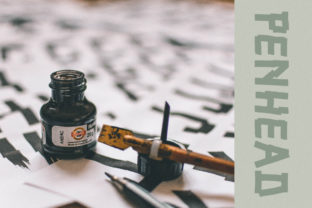
When you first load Penhead into your design software or browser preview, the difference is immediate. It belongs to the Script Amp category of fonts, which means it carries the fluidity of a handwritten note but with the structural integrity needed for modern typography. Unlike some overly decorative scripts that look messy on screen, Penhead maintains a consistent stroke weight and clear letterforms. This makes it an excellent choice for display font use cases where you need a headline to pop against a background image or a solid color block.
In the context of web design, visual hierarchy is everything. Penhead excels at drawing the eye. When placed as a primary header on a portfolio homepage or a course sales page, it creates an emotional connection before the user even reads the body copy. The curves are elegant but not fussy, giving it a sophisticated edge that works well for brands in wellness, creative services, lifestyle blogging, and boutique e-commerce. It feels like a premium font because it balances artistic flair with legibility, ensuring your brand identity shines through without overwhelming the user interface.
Testing Penhead in Real-World Hero Sections
To truly understand how a typeface performs, you have to see it in action within a responsive layout. I tested Penhead across several different scenarios, starting with a large hero banner for a wedding planning service. The goal was to overlay the text on a high-resolution image of a floral arrangement. Often, script fonts struggle here; the intricate details can get lost against complex backgrounds. However, Penhead held its own beautifully. With a subtle drop shadow or a semi-transparent backdrop, the letters remained crisp and readable even on smaller mobile screens.
I also experimented with using Penhead for a product landing page selling handmade ceramics. The headline "Crafted with Soul" looked stunning in this font. It conveyed the artisanal nature of the product immediately. One key takeaway from this test was the importance of sizing. Because Penhead has tall ascenders and descenders, it needs adequate vertical spacing. In the desktop view, I gave it plenty of line height, but when checking the mobile breakpoint, I had to ensure the font size didn’t shrink below 32px. Below that threshold, the delicate loops of the script started to blur slightly on lower-resolution devices. This is a crucial consideration for any designer implementing script fonts in a responsive environment.
Strategic Font Pairing for Readability
While Penhead is a star performer for headlines, it is not designed for long-form reading. Using a script font for body copy is a recipe for poor user experience and low readability. Instead, the power of Penhead lies in its ability to be paired effectively with other typefaces. My preferred strategy is to pair this creative font with a simple, neutral sans serif font for all body text, navigation menus, and form labels.
This combination creates a perfect balance. The sans serif provides the structure and clarity needed for scanning content, while Penhead adds the unique character and warmth to the headings. For example, on a blog redesign, I used Penhead for the post titles and the author's signature, while keeping the article text in a clean geometric sans serif. This contrast guides the user’s eye naturally through the page. If you prefer a more editorial look, pairing Penhead with a classic serif font can also work wonders, creating a timeless aesthetic suitable for luxury brands or literary portfolios. The key is to let Penhead do what it does best: make a statement, while letting your secondary font handle the heavy lifting of information delivery.
Where Penhead Shines and Where to Avoid It
Knowing the limitations of a font is just as important as knowing its strengths. Penhead is fantastic for short phrases, names, titles, and decorative wording. It is ideal for:
- Hero Section Headlines: Making a bold first impression on landing pages.
- Call-to-Action Buttons: Adding a touch of elegance to primary buttons (provided the text is short).
- Logo Design: Creating memorable brand marks for creative businesses.
- Social Media Graphics: Standing out in crowded feeds with Instagram stories or Pinterest pins.
- Section Dividers: Breaking up content with stylish subheaders.
However, there are areas where Penhead should be avoided. Do not use it for small navigation links, footer text, or technical instructions. The intricate details of the script can become indistinguishable at small sizes, leading to accessibility issues. Similarly, avoid using it for dense data tables or dashboard layouts where clarity is paramount. If you are designing a SaaS application or a financial tool, stick to utilitarian fonts for the UI elements and reserve Penhead for marketing materials or branding assets only.
Licensing and Technical Considerations for Developers
Before integrating Penhead into a live website or a client project, it is vital to check the licensing terms. As a commercial font, you must ensure you have the appropriate license for web use. Many designers purchase a desktop license only to find they cannot legally embed the font on a website via @font-face or Google Fonts integration. Always verify if the package includes webfont files (WOFF, WOFF2) and check the restrictions regarding the number of domains or page views allowed.
Additionally, check the file formats and included styles. Does Penhead come with alternates, ligatures, or swashes? These features can add extra polish to your logo design or special headers. Multilingual support is another factor to consider if your audience is global. Ensuring the font supports the necessary character sets will prevent broken characters or missing glyphs in your final build. By paying attention to these technical details, you ensure that your implementation of Penhead is not only beautiful but also robust and compliant.
Bringing Your Brand Identity to Life Online
In the crowded landscape of the internet, standing out requires more than just good code; it requires great design choices. Penhead offers a unique opportunity to elevate your brand identity with a touch of authentic handwriting. Whether you are building a personal portfolio, launching a new online store, or refreshing a coaching website, this font can turn a standard design idea into a standout experience.
The beauty of Penhead lies in its versatility within the constraints of good UX. It respects the user’s need for clarity while satisfying the desire for aesthetics. When used correctly—paired with clean body fonts, sized appropriately for mobile, and reserved for impactful headlines—it becomes a powerful tool in your digital arsenal. For those of us who spend our days crafting digital experiences, finding a font that feels both professional and personal is rare. Penhead delivers exactly that, making it a worthy addition to any designer’s library of design assets.